
Fan referrals,
turned into sales.
codoc offers two affiliate programs that reward those who refer your paid content. The right to refer belongs only to readers who have purchased the content or to people chosen by the Creator. Referrals from those who truly value your work bring in new readers and new sales.
Two affiliate services
The Content Referral Affiliate is for readers who want to spread your content; the Partner Program is for Creators who want to spread codoc. Choose the one that fits your goal.
| Content Referral AffiliateAn affiliate program to promote content created by codoc users (creators). | Partner ProgramAn affiliate program for referring new members to codoc. | |
|---|---|---|
| Eligible Participants (Reward Recipient) |
・Content Buyer ・User designated by the creator |
・Creators |
| Referral Reward Reward Conditions |
When the referred paid content is purchased | When the user who registered via referral sells paid content that is purchased |
| Reward Eligibility Period | Start and end period specified by the creator | Up to 365 days from the referred user’s registration date |
| Cookie Validity Period | 30 days | 30 days |
| Referral Rate | Percentage set by the creator | 5% of the sale price |
Content Referral Affiliate
 Content Buyer
User designated by the creator
Content Buyer
User designated by the creator
Only the two types of users above can issue links through the Content Referral Affiliate. A system Creators can trust, where only those who know the content's value can become referrers.
For Content Buyers
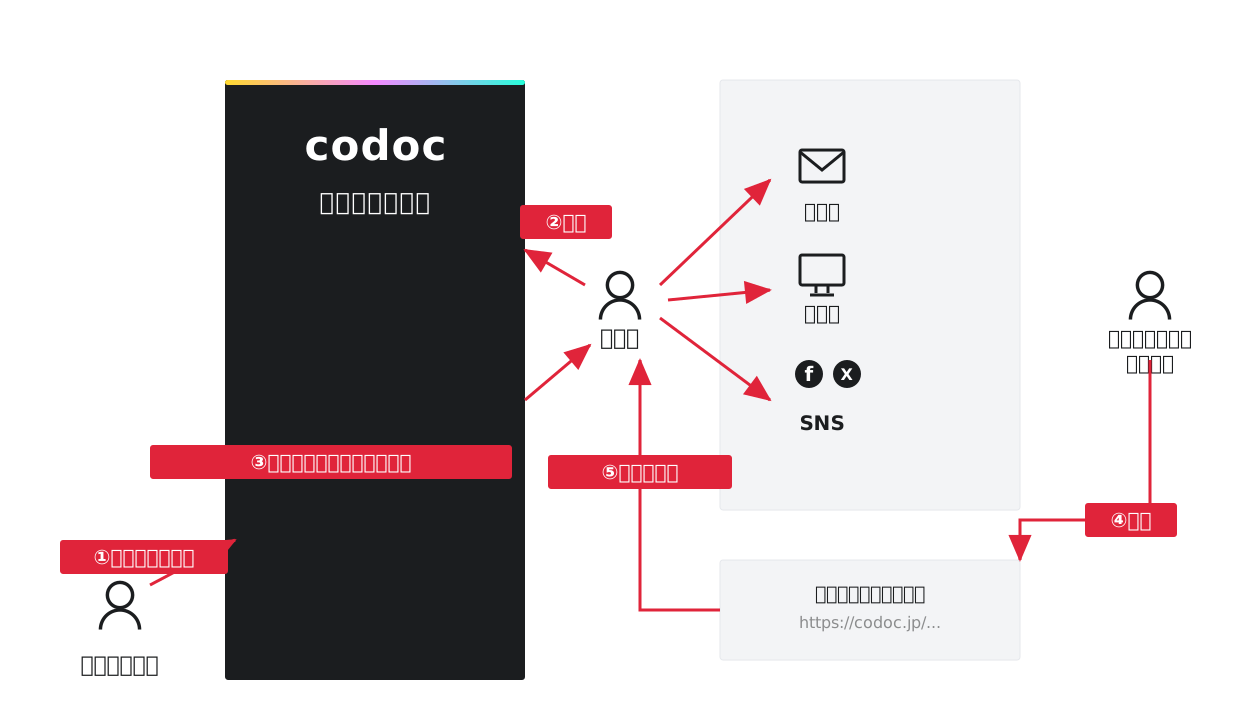
When a Creator turns the affiliate setting ON, a dedicated affiliate link is issued (③) to readers who have purchased the content (②).
Readers can share that link by posting it on their blog, social media, email, and more.
When the content is purchased through the link (⑤), the referrer receives a commission (⑥) at the rate the Creator set against the sale price.
For codoc Users Designated by the Creator
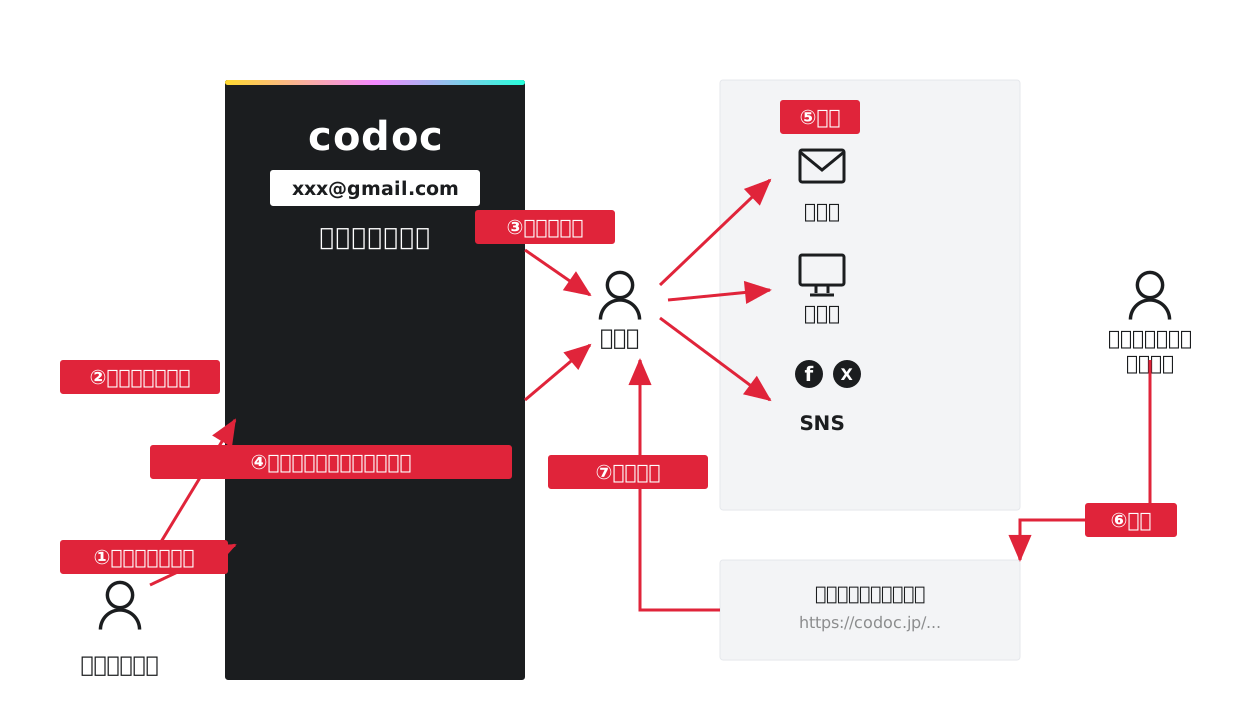
Creators can register a list of users they'd like to have refer their content (②③), per piece of paid content. Designated users can obtain an affiliate link (④) even without having made a purchase.
From there it works just like for Purchasers. They refer the content (⑤), and when it's purchased through the link (⑥), they receive a referral commission (⑦).
Money Distribution in Content Referral Affiliate
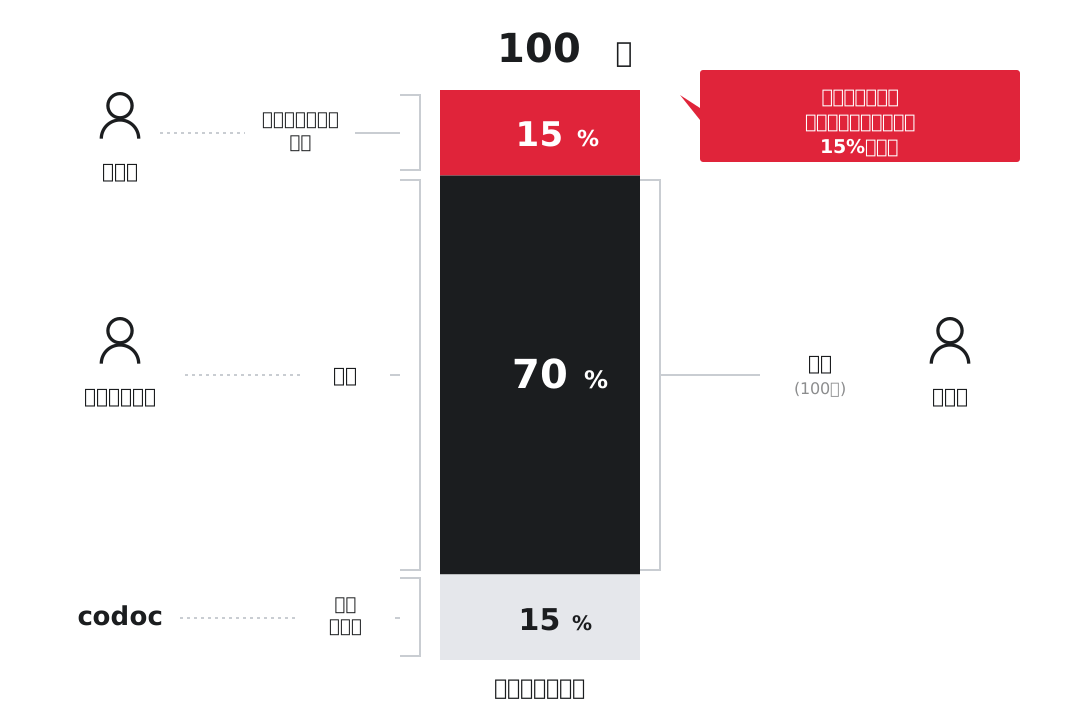
The diagram above shows an example where the affiliate commission is set to 15% on content priced at ¥100. ¥15 goes to the referrer and ¥15 to the Sales Fee, leaving the Creator with ¥70 (70%).
Since the 15% Sales Fee is fixed, Creators can freely set the affiliate commission rate within the remaining 85%.
How to Set Up and Use Content Referral Affiliate
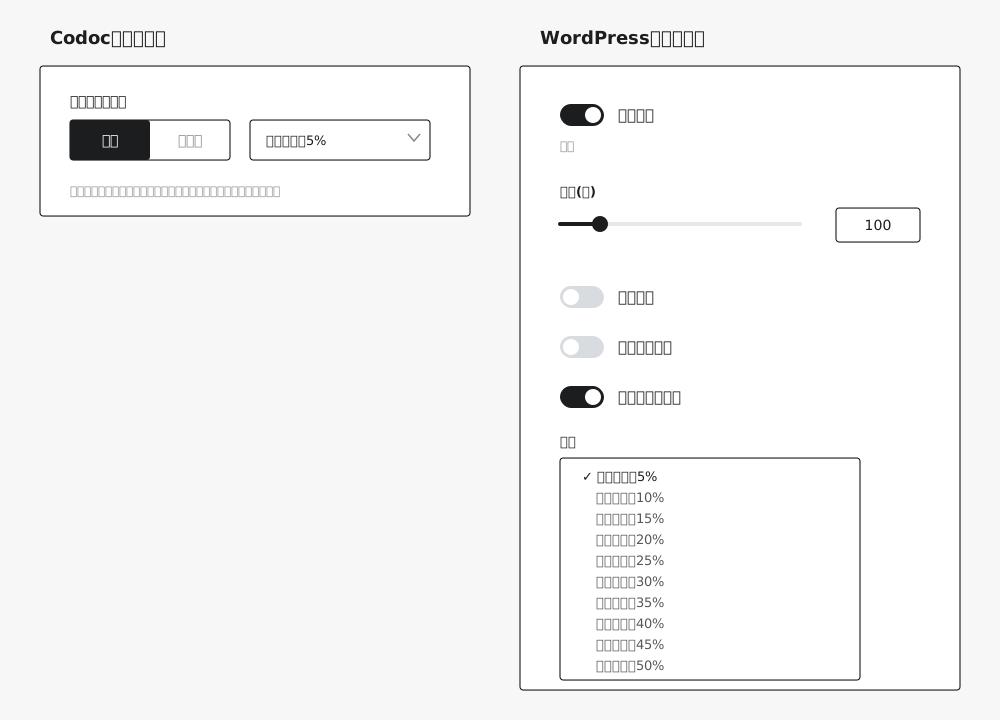
Turn the affiliate setting ON in the content management screen to choose your commission rate.
Save your settings, and the affiliate feature is enabled at the rate you specified. That's all it takes.
![Sign into codoc and select [Affiliate] from the left sidebar menu.](/img/lp/share/contents_image_02.svg)
To designate a user and invite them to refer your content, log in to codoc and select [Affiliate] in the left side menu.
![The [Active Partnerships] tab](/img/lp/share/contents_image_03.svg)
Make sure the [Active Partnerships] tab is open,
・the email address of the user you'd like to refer your content
・Item
・Affiliate rate (percentage of sale price)
enter and select it, then press the [Register] button to complete the setup.
| Payment Method | Affiliate Settings | Notes |
|---|---|---|
| One-time Payment | ● | A commission at your set rate is earned on every sale. |
| Recurring billing (Reader Plans) | ● | A commission is earned on the first charge only. Subsequent recurring charges are not eligible. |
| Tip | × | Since the content is open to all users in exchange for support, it is not eligible for affiliates. |
After logging into codoc, select 'Affiliate' from the left sidebar menu.
Then, click the [Join Now] button at the top right of the screen.
![Select the product you want an affiliate link for and click [Register]](/img/lp/share/contents_image_04.svg)
Purchased paid content with the affiliate feature turned ON can be selected from the dropdown list.
Select the product you want an affiliate link for, then click the [Register] button.
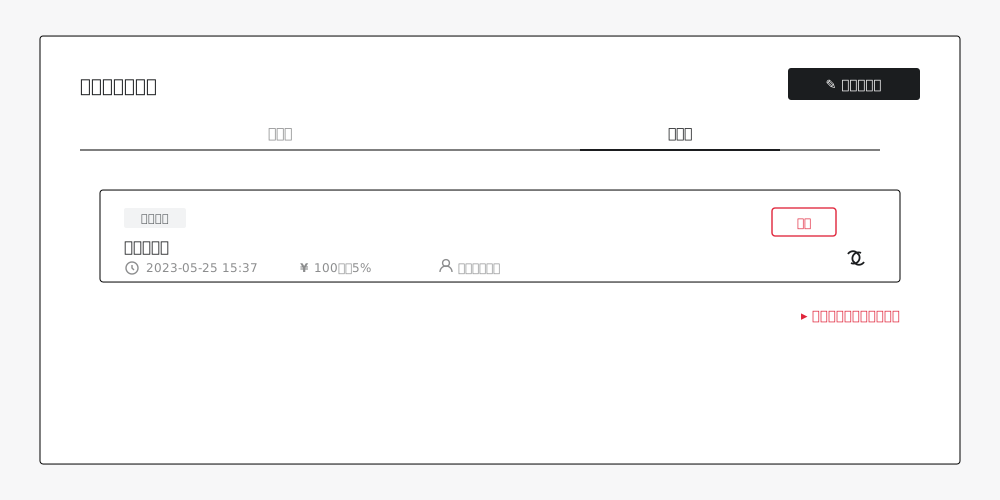
After registration, the content will appear under the [Participating] tab as shown above.
Press the link button at the bottom right to get your affiliate link. Then just share it on your blog or social media.
Partner Program
An affiliate program that pays a commission when a Creator using codoc refers a new member.
| Application and Review | After registering your bank details, apply for the partner program from your account screen. Use is granted upon approval by the codoc support team. |
|---|---|
| Referral Reward Conditions | When paid content sold by a referred and newly registered creator is purchased |
| Reward Eligibility Period | Up to 365 days from the new creator’s registration date |
| Cookie Validity Period | 30 days |
| Referral Rate | 5% of the sale price |
codoc Partner Program
It's a revenue-share model based on the Sales Fees generated by the members you refer. See the dedicated page for details on how to join and the conditions.
Learn More
Frequently Asked Questions
Who sets the referral commission rate?
Can I refer Content I haven't purchased?
Are Reader Plans (recurring billing) eligible too?
How long is a referral link valid?
How do I receive my rewards?
Can anyone join the Partner Program?
For referring great content,
a fitting reward.
Setting up and joining the affiliate program is free. Sign up for codoc and start today.
Sign Up Free